It's all about the content
Bohemica Signage lets you focus on creating the best possible video
campaigns while keeping the management of your screens as simple as possible.
Manage your media content
- Online dashboard There is no need to be physically present by your screens. Our modern web-based dashboard is able to communicate with the Players.
- Video quality optimization for smooth playback Bring in your videos and Bohemica Signage will check the quality of the material. Websites can be used as well for live content!
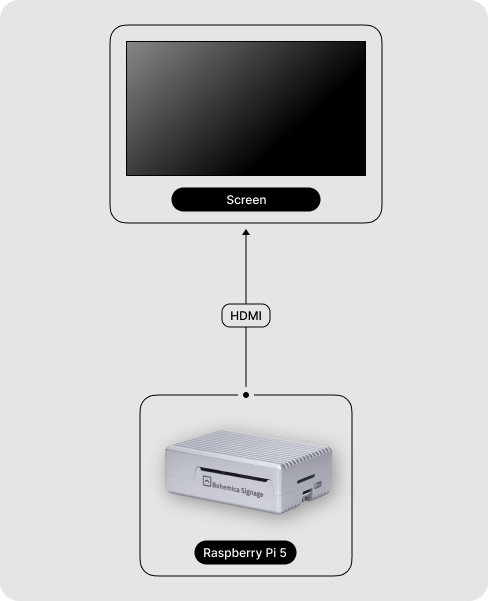
- Bring your own hardware Or stay with our recommended solutions. We officially support Raspberry Pi 5 and Asus NUC.
Packed with features
Manage everything from one place
The whole system runs from a single cloud dashboard in your browser — nothing to install, and no IT specialist required to get started.
-
One central dashboard
Control all your screens, from one to thousands, from a single place.
-
Upload your media
Drag files in and they're instantly ready to schedule and play.
-
Build playlists
Arrange content in the order you want with simple drag-and-drop reordering.
-
Push changes live
Edit a playlist and connected screens update instantly — no USB sticks.
-
See what's playing
Watch, live, exactly what each screen is showing right now.
-
Work from anywhere
Manage screens in another building, city, or country from any browser.
Content that fits any screen
Mix and match any kind of content in a single playlist, and let the system deliver the right quality to each screen automatically.
-
Video
Play MP4 video with configurable repeat counts.
-
Images
Show JPG and PNG images for a display duration you set down to the second.
-
Live web pages
Display a website, dashboard, or web app directly on screen.
-
Mixed playlists
Combine video, images, web, and audio in any order you like.
-
Central media library
Keep everything organized with folders and search.
-
Automatic quality variants
Each video is prepared in multiple qualities (up to 4K) and the right one is sent to each screen automatically.
Scheduling & automation
Decide not just what plays, but exactly when — and let routine on/off cycles run themselves.
-
Time windows
Set the hours and minutes content is allowed to play.
-
Days & date ranges
Different content on weekdays vs. weekends, and start/end dates for campaigns.
-
Priority layering
When playlists overlap, higher-priority content takes over and lower-priority content resumes afterward.
-
Business-hours scheduler
Screens turn on before you open and off when you close — saving energy and extending display life.
In-store audio & ad spots
Turn your store's speakers into a revenue channel. Play background music, weave in advertising spots at set frequencies, and sell that airtime to your suppliers and partners.
More about in-store audio-
Background music
Continuous in-store music from your own audio files - mp3, wav, aac, flac, m4a, wma, and ogg.
-
Ad spots at a set frequency
Organize spots into groups and give each group its own frequency, from 1 to 120 plays per hour. Groups run independently: a sponsor 7×, a promo 23×, a jingle 13× per hour.
-
Even, collision-free rotation
Spots are spread evenly across the hour on a precise, drift-free grid. Groups with the same frequency are automatically offset so they don't collide; overlapping breaks queue back-to-back.
-
Music that never loses its place
Music pauses for a spot break and resumes from the exact moment it stopped - no skipped songs, no dead air.
-
Scheduled like your screens
Audio playlists use the same days, time windows, date ranges, and priority layering as visual playlists.
-
Preview & verification
See the audio schedule up to 36 hours ahead, and verify achieved vs. planned plays per group, break composition, and the ad share of each hour.
Organize your screens
Group and arrange screens to match how your organization actually works.
-
Display groups
Batch screens by branch, floor, room, or content type — one playlist can feed many groups.
-
Locations & map
Each site keeps its own time zone; see every location on a map with offline sites easy to spot.
-
Orientation & multi-screen
Portrait or landscape per screen, and drive several displays from one device.
-
Remote restart
Restart a screen from the dashboard whenever you need to.
Work as a team
Bring colleagues in without handing over the keys to everything.
-
Invite users
Add team members by email in seconds.
-
Role-based access
Administrator, editor, and media-only roles so people see only what they should.
-
Divisions & workspaces
Keep separate brands, branches, or departments cleanly apart in one account.
-
Per-user language
Each team member uses the dashboard in their preferred language.
Monitoring & peace of mind
Know your screens are doing their job — and hear about it the moment they aren't.
-
Real-time status
See the online/offline state of every screen at a glance.
-
Live preview & history
Preview what each screen shows now, and review when it went offline and came back.
-
Offline alerts
Email alerts when a screen drops out, with a threshold you choose and sensible rate limiting.
-
Proactive alerts
Get warned about low disk space and approaching certificate expiry before they bite.
Built to run 24/7, unattended
This is the part that lets you forget the screens are even there. Devices recover on their own, even when nobody is around.
-
Self-healing recovery
A built-in watchdog detects a frozen player and restarts it; persistent failures trigger an automatic reboot.
-
Crash recovery
The player reloads instantly after a glitch and keeps running.
-
Offline playback
Content is cached locally, so screens keep playing even if the internet drops.
-
Emergency scheduling
If a device can't reach the server, it intelligently repeats its last known schedule instead of going dark.
-
Over-the-air updates
Player software updates itself in the background, preserving your downloaded content.
-
Frame-accurate sync
Synchronize video to the millisecond across screens to form one large picture — no video-wall controller needed.
Hardware & deployment, your way
Run it on affordable hardware, and set it up however suits you.
-
Affordable hardware
Runs on a Raspberry Pi 5 for Full HD or an Intel / ASUS NUC for higher resolutions — the same software on both.
-
Up to 8K output
Drive everything from Full HD to 8K on capable hardware.
-
Professional display control
Automatic power on/off and control for supported Samsung and LG commercial displays.
-
Plug-and-play
Flash a ready-made disk image and pair instantly, or order pre-configured hardware bundles.
-
Wired or wireless
Ethernet for rock-solid stability, or Wi-Fi with smart selection of the strongest, least-crowded band.
-
Quick pairing
A short, human-readable Device ID makes registering a screen simple.
Security & privacy
Enterprise-grade protection for accounts, devices, and data.
-
Two-factor authentication
Via an authenticator app or SMS, with recovery codes.
-
Single sign-on
Sign in with Google or Microsoft accounts.
-
Encrypted remote management
Devices are reached through an encrypted, secure channel and are never exposed directly to the internet.
-
Hardware-bound device identity
A screen's pairing is tied to its hardware, so it stays recognized even after a reset or SSD change.
-
Isolated data per customer
Each organization's data is kept fully separate from everyone else's.
-
Activity & audit logging
A clear record of who did what, across your account.
Go beyond the dashboard
Everything you need to integrate Bohemica Signage into your own systems and brand.
-
REST API
A documented API, webhooks, and real-time updates for live integrations.
-
Custom integrations
Pull live data from queue systems, booking systems, and internal business applications.
-
Whitelabel branding
Run the platform under your own brand and colors.
-
Flexible billing
Usage-based, per-display pricing — with one display free forever and no credit card to start.